Live Demo
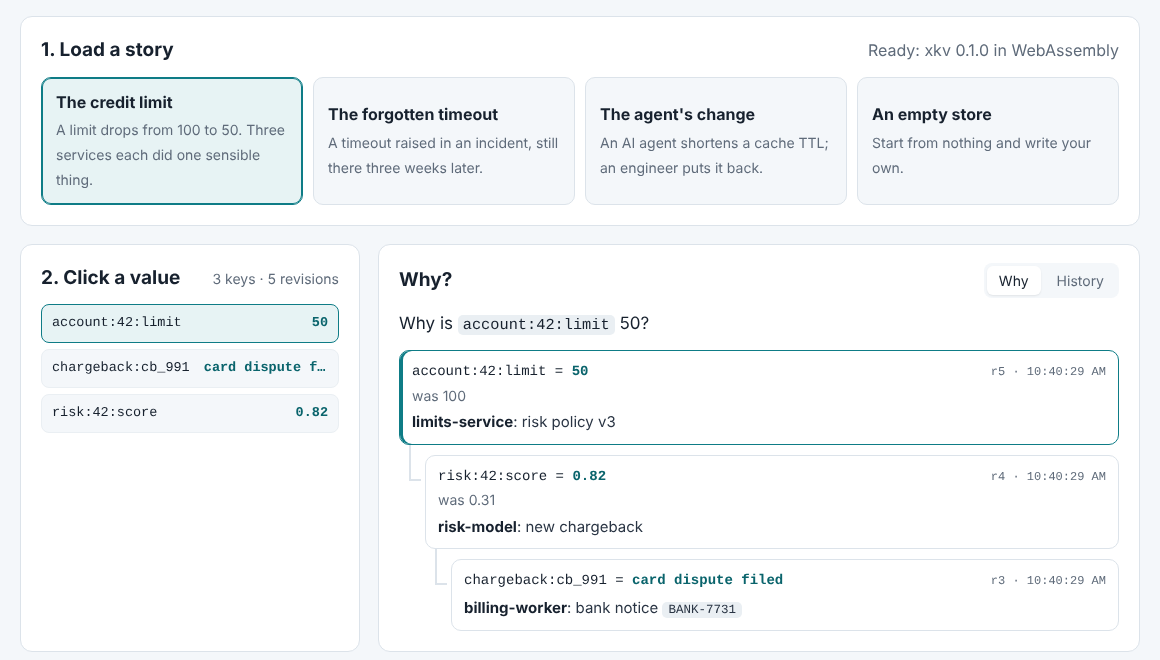
The demo runs XKV in your browser. It’s the Go package itself, compiled to WebAssembly, with the store’s file kept in memory. Nothing needs installing, and nothing you type leaves the page.
What You Can Do
- Load a story. Three short histories are ready to load: a credit limit that dropped, a timeout raised during an incident, and a cache setting an AI agent changed before an engineer put it back. Each is a handful of real writes made through the store, with their causes.
- Click a value. The store answers why, and the tree unfolds one level at a time: the value, the change that caused it, the change that caused that, and so on, across keys. Each step shows who made it, the reason they gave, the value before, and any outside reference such as a ticket or a tool call id.
- Write your own change. Pick a key, a value and a reason, tick the keys whose current value caused your change, and write it. It joins the chain at once. Leave the reason out and the store refuses, with the same error the Go package and the
xkvcommand give. - See the history. The History tab lists every revision of a key, newest first, with what caused each one.
How It Works
The page loads xkv.v1.wasm, built from the wasm folder of the code repository, and Go’s own wasm_exec.js loader. The store behind it is xkv.OpenMemory, which behaves like a file-backed store with the bytes in memory. Strict mode, cause checks and the why walk are the same code that runs on a server.
The stories match the case studies, where each one also comes as a Go program you can run.